
What it is for
The API is designed for transport companies and shippers that already manage their orders or shipments in an ERP or TMS and want the DeCA to be issued automatically, without keying in the data again.
1. Your ERP / TMS
Sends the order or shipment over HTTPS (JSON, Bearer + Idempotency-Key).
2. DeCA API
Validates the mandatory data and issues the DeCA.
3. You receive
The reference, the PDF with QR code and the public verification URL.
Need to explain it to your company? The DeCA API page covers what it does, who it is for and what it costs, without the technical details.
API access is a paid add-on: API Lite with the Professional plan (€39.95/month + VAT) or API Advanced with the Business plan (€49.95/month + VAT) for ERP/TMS integrations. DeCAs created through the API count towards the same monthly plan allowance as those created from the dashboard.
Getting started
- Activate the API add-on from Plan & billing (API Lite with the Professional plan; API Advanced with the Business plan). If you have any questions, write to us at integraciones@praetoriaabogados.es.
- Open the Integrations tab: as soon as the add-on is active, the company's Administrators find it in their dashboard menu. It is the integration hub: there you create, rotate and revoke your keys (up to 2 active at the same time, all sharing the company's allowance and limits), test the connection, try out shipments in the simulator without using your allowance, set up webhooks and download the kit. The full key is shown only once, when it is created.
- Test the connection with
GET /api/v1/me. - Validate a DeCA with
POST /api/v1/decas/validate: it creates nothing and does not use your allowance. - Create your first DeCA with
POST /api/v1/decasand store the verification URL.
curl https://decaprofesional.es/api/v1/me \
  -H "Authorization: Bearer $DECA_API_KEY"
Authentication
Every request carries the integration key in the Authorization header. HTTPS only; never send the key in the URL or include it in code that runs in the browser.
Authorization: Bearer fvd_live_<key-id>_<secret>The company is always the one the credential belongs to: no field in the request (tax ID, identifiers) switches company. A lost key cannot be recovered: request a new one or rotate it. Anything your credential cannot see returns 404.
API Lite and API Advanced
API Lite (Professional plan + €39.95/month + VAT): validate, create, retrieve, download the PDF of and correct or annul your integration's DeCAs; up to 100 DeCAs per month through the API within the plan allowance, 1 key and 20 requests per minute. Any other route returns 403 api_advanced_required, and creation number 101 in a month returns 429 api_lite_limit_reached. Contract with its routes only: openapi-lite.json.
API Advanced (Business plan + €49.95/month + VAT): every route on this page — signed webhooks, batches, synchronisation of Saved data (Datos habituales), load orders, drafts, data requests to third parties and automatic sending by email (autoDispatch), with the Business plan allowance.
# 1) Validate without creating anything
curl -X POST https://decaprofesional.es/api/v1/decas/validate -H "Authorization: Bearer $KEY" -H "Content-Type: application/json" -H "Idempotency-Key: val-001" -d @shipment.json
# 2) Create the DeCA
curl -X POST https://decaprofesional.es/api/v1/decas -H "Authorization: Bearer $KEY" -H "Content-Type: application/json" -H "Idempotency-Key: exp-001" -d @shipment.json
# 3) Download the PDF
curl https://decaprofesional.es/api/v1/decas/$ID/pdf -H "Authorization: Bearer $KEY" -o deca.pdfcurl -X POST https://decaprofesional.es/api/v1/decas -H "Authorization: Bearer $KEY" -H "Content-Type: application/json" -H "Idempotency-Key: exp-002" -d '{
...DeCA data...,
"autoDispatch": { "recipients": [
{ "role": "driver", "email": "driver@yourcompany.com", "name": "Driver" },
{ "role": "shipper", "email": "traffic@shipper.com" }
] }
}'
# Response: "autoDispatch": { "recipients": [{ "role": "driver", "email": "d***@yourcompany.com", "status": "sent" }, ...] }
# "sent" = accepted by the mail server (it does not confirm delivery or reading). A retry with the same
# Idempotency-Key returns "status": "replayed" and sends nothing more. Up to 3 recipients, no CC.Endpoints
/api/v1/meLite and AdvancedChecks the credential: integration, company, permissions, limits and usage this month.
The first endpoint to call to verify the connection.
/api/v1/decas/validatedeca:createLite and AdvancedValidates a DeCA without creating it: same rules as creation.
It creates no DeCA, generates no PDF and does not use up the plan allowance.
/api/v1/decasdeca:createLite and AdvancedIdempotency-Key requiredCreates a DeCA and returns the verification URL, the reference and the PDF.
Returns 201 (or 200 if it is a retry with the same Idempotency-Key). With completionRequest (or draft: true) it creates a draft and returns 202: see «Completion of a DeCA by a third party».
/api/v1/decasdeca:readAdvanced onlyLists the DeCAs, newest first, with cursor pagination.
Filters: limit (1–100, default 25), cursor, externalId, groupageRef (groupage reference, G-…), status (active | annulled), createdFrom, createdTo (DD-MM-YYYY, days in Madrid time; createdTo includes the whole of that day). All API dates are in DD-MM-YYYY and all times in Madrid time.
/api/v1/decas/{id}deca:readLite and AdvancedThe full DeCA: status, service period, verification URL, PDF and data.
/api/v1/decas/{id}/statusdeca:readLite and AdvancedLightweight status (version, availability, verification URL) for periodic polling.
/api/v1/decas/{id}/versionsdeca:readAdvanced onlyVersion history: reason for the change, origin (api / user), and the URL and PDF of each version.
/api/v1/decas/{id}/pdfdeca:readLite and AdvancedDownloads the PDF (current version or ?version=N).
Headers X-Pdf-Sha256 (PDF fingerprint) and X-Deca-Status (active | annulled).
/api/v1/decas/{id}/correctionsdeca:correctLite and AdvancedIdempotency-Key requiredCorrects a DeCA: creates a new version with a new URL, QR code and PDF.
Returns 201 with the new version (200 if it is a retry with the same Idempotency-Key). Only DeCAs created by the same integration; previous versions are kept.
/api/v1/decas/{id}/vehiclesdeca:readAdvanced onlyVehicles of the transport: the initial one and every recorded change, with the current one flagged.
/api/v1/decas/{id}/vehicle-changesdeca:correctAdvanced onlyIdempotency-Key requiredRecords a vehicle change (tractor unit and, if it changes, trailer) during the transport.
It is a correction: a new version with a new URL, QR code and PDF, which does not use up any DeCA from the plan. The date (DD-MM-YYYY) must fall within the transport and after the previous change. Without trailerPlate the previous trailer is kept. Returns 201 (200 if it is a retry with the same Idempotency-Key).
/api/v1/decas/{id}/annulmentdeca:annulLite and AdvancedAnnuls a DeCA. The annulment is final; repeating the call returns 200 with no changes.
Only DeCAs created by the same integration.
/api/v1/decas/{id}/completion-requestdeca:createAdvanced onlyIdempotency-Key requiredAsks a third party, by email, for the data missing from a draft.
Returns 201 (200 if it is a retry with the same Idempotency-Key). Only drafts of the same integration.
/api/v1/decas/{id}/completion-request/resenddeca:createAdvanced onlyIdempotency-Key requiredResends the request with a new link (the previous one stops working).
Returns 201 (200 if it is a retry). At most 5 resends per draft per hour.
/api/v1/decas/batchdeca:createAdvanced onlyIdempotency-Key requiredCreates up to 50 DeCAs in a single call (batch).
Body { items: [ …same format as POST /decas… ] }. Returns 202 with the batch already validated: each item is pending or failed with its details (one error does not affect the others). Creation continues in the background; check GET /api/v1/batches/{id}. Each item uses up one DeCA from the plan, like a normal creation. The same Idempotency-Key with the same body returns the same batch (200); a DeCA is never duplicated.
/api/v1/batches/{id}deca:readAdvanced onlyStatus of the batch and result of each item (created, replayed, failed, pending).
status changes from processing to completed when every item has finished.
/api/v1/batches/{id}/pdfsdeca:readAdvanced onlyDownloads a ZIP file with the current PDF of each DeCA created by the batch.
Returns 409 batch_without_documents if the batch has not created any DeCA yet.
/api/v1/draftsdeca:createAdvanced onlyIdempotency-Key requiredOpens a new, independent draft (partial data). It does not use up the allowance.
Returns 201 with draftId (200 if it is a retry with the same Idempotency-Key).
/api/v1/draftsdeca:readAdvanced onlyLists the drafts: status=open (default) | generated | cancelled | all.
Paginated with limit and cursor, like /decas. Drafts belong to the company: with deca:read_company you also see the drafts started on the website (origin: "web") and those of other integrations, and you can complete, generate or discard them.
/api/v1/drafts/{id}deca:readAdvanced onlyA draft, with ready and issues (what is still missing before it can be generated).
/api/v1/drafts/{id}deca:createAdvanced onlyModifies or completes an open draft (JSON Merge Patch).
Optional If-Match with the ETag: 412 if another change arrived first.
/api/v1/drafts/{id}/generatedeca:createAdvanced onlyGenerates the final DeCA from that draft; the other drafts do not change.
201 with the DeCA; repeating the call returns the same DeCA (200). This is where the allowance is used up.
/api/v1/drafts/{id}deca:createAdvanced onlyDiscards an open draft (it becomes cancelled).
/api/v1/decas/{id}/service-completiondeca:correctAdvanced onlyMarks the service as finished (operational data; the DeCA, its PDF and its URL do not change).
Optional body { note } (up to 500 characters). Idempotent: returns the DeCA with service.finished. 409 deca_annulled on an annulled DeCA. Webhook deca.service_finished.
/api/v1/decas/{id}/service-completiondeca:correctAdvanced onlyReopens a service marked as finished (it goes back to pending).
Idempotent. Webhook deca.service_reopened.
/api/v1/load-ordersdeca:readAdvanced onlyLists the load orders: number, status, format (combined or separate), linked DeCA, pending plates and acceptance.
Filters: decaId, status (pending_vehicle | active | cancelled), limit (1–100). Without deca:read_company, only those of DeCAs created by your integration. It never includes the price or the conditions (they are in the PDF). To issue one: POST /api/v1/decas with loadOrder.
/api/v1/load-orders/{id}deca:readAdvanced onlyA load order: status, current version, linked DeCA and acceptance by the carrier.
/api/v1/load-orders/{id}/pdfdeca:readAdvanced onlyThe PDF of the current version of the load order.
/api/v1/saved/companiessaved:readAdvanced onlyLists the saved companies (shippers and carriers) of the company.
In order of creation. Parameters: limit (1–100, default 50), cursor (nextCursor from the previous page) and externalId (exact match). Also includes the records created on the website (externalId null).
/api/v1/saved/companies/{externalId}saved:readAdvanced onlyReads a record by the identifier from your ERP or TMS (externalId).
/api/v1/saved/companies/{externalId}saved:writeAdvanced onlyCreates or updates the record with that externalId (sync without duplicates).
Returns 201 when it creates the record and 200 when it updates it; repeating the same call leaves the same record. It is validated with the same rules as the website and appears immediately in Saved data («Datos habituales»). It never changes a DeCA that has already been generated.
/api/v1/saved/companies/{externalId}saved:writeAdvanced onlyDeletes the record with that externalId.
It never changes a DeCA that has already been generated.
/api/v1/saved/vehiclessaved:readAdvanced onlyLists the saved vehicles (with their usual driver) of the company.
In order of creation. Parameters: limit (1–100, default 50), cursor (nextCursor from the previous page) and externalId (exact match). Also includes the records created on the website (externalId null).
/api/v1/saved/vehicles/{externalId}saved:readAdvanced onlyReads a record by the identifier from your ERP or TMS (externalId).
/api/v1/saved/vehicles/{externalId}saved:writeAdvanced onlyCreates or updates the record with that externalId (sync without duplicates).
Returns 201 when it creates the record and 200 when it updates it; repeating the same call leaves the same record. It is validated with the same rules as the website and appears immediately in Saved data («Datos habituales»). It never changes a DeCA that has already been generated.
/api/v1/saved/vehicles/{externalId}saved:writeAdvanced onlyDeletes the record with that externalId.
It never changes a DeCA that has already been generated.
/api/v1/saved/placessaved:readAdvanced onlyLists the saved loading and unloading places of the company.
In order of creation. Parameters: limit (1–100, default 50), cursor (nextCursor from the previous page) and externalId (exact match). Also includes the records created on the website (externalId null).
/api/v1/saved/places/{externalId}saved:readAdvanced onlyReads a record by the identifier from your ERP or TMS (externalId).
/api/v1/saved/places/{externalId}saved:writeAdvanced onlyCreates or updates the record with that externalId (sync without duplicates).
Returns 201 when it creates the record and 200 when it updates it; repeating the same call leaves the same record. It is validated with the same rules as the website and appears immediately in Saved data («Datos habituales»). It never changes a DeCA that has already been generated.
/api/v1/saved/places/{externalId}saved:writeAdvanced onlyDeletes the record with that externalId.
Returns 409 saved_in_use if a saved shipment uses that place.
/api/v1/saved/shipmentssaved:readAdvanced onlyLists the saved shipments (loading place + unloading place + goods) of the company.
In order of creation. Parameters: limit (1–100, default 50), cursor (nextCursor from the previous page) and externalId (exact match). Also includes the records created on the website (externalId null).
/api/v1/saved/shipments/{externalId}saved:readAdvanced onlyReads a record by the identifier from your ERP or TMS (externalId).
/api/v1/saved/shipments/{externalId}saved:writeAdvanced onlyCreates or updates the record with that externalId (sync without duplicates).
Returns 201 when it creates the record and 200 when it updates it; repeating the same call leaves the same record. It is validated with the same rules as the website and appears immediately in Saved data («Datos habituales»). Places are referenced by their externalId (loadPlaceExternalId, unloadPlaceExternalId): sync them first. It never changes a DeCA that has already been generated.
/api/v1/saved/shipments/{externalId}saved:writeAdvanced onlyDeletes the record with that externalId.
It never changes a DeCA that has already been generated.
Create a DeCA
The body describes the transport: dates, vehicle, contractual shipper (shipper), actual carrier (carrier) and from 1 to 50 shipments. Countries are always two-letter ISO codes (ES, FR, PT…). Unknown fields are rejected.
| Field | Required | Description |
|---|---|---|
externalId | Recommended | Your identifier (order, shipment). 1–100 characters: letters, digits and . _ - /. Unique among the company's active DeCAs. |
loadDate, unloadDate | Yes | DD-MM-YYYY. Unloading cannot be earlier than loading. |
vehicle.tractorPlate | Yes | Registration plate (normalised: upper case, no spaces or hyphens). trailerPlate optional. |
vehicle.secondTrailerPlate | No | Second trailer or semi-trailer (two-trailer combinations). Requires trailerPlate and must be different from it. |
shipper, carrier | Yes | Company (name, taxId, address; country, postalCode, city optional) or "self". |
shipments[] | Yes | loadLocation and unloadLocation (name, address, postcode, city, optional province, ISO country), goods, weight (a number = kg, or text such as "22 pallets"), optional recipient. |
reference | No | Up to 120 characters; printed on the DeCA. |
notes | No | Up to 1000 characters, on a single line. |
serviceType | No | goods (default) or passenger (passenger transport). |
groupageRef | No | Common reference for the independent DeCAs of a groupage consignment (one DeCA per shipper): “G-” followed by 6 to 16 letters or digits. Filter with GET /api/v1/decas?groupageRef=…. |
loadOrder | No | Issues a load order together with the DeCA: format (joint, in the same document, or separate), price, currency (EUR, USD, GBP, CHF), taxNote (unspecified, excluded, included), conditions, paymentTerms and billingInstructions. Only if your company is the contractual shipper and your plan includes the load order. |
curl -X POST https://decaprofesional.es/api/v1/decas \
  -H "Authorization: Bearer $DECA_API_KEY" \
  -H "Content-Type: application/json" \
  -H "Idempotency-Key: $(uuidgen)" \
-d @deca.json{
"externalId": "TR-45882",
"reference": "Pedido 88231",
"loadDate": "06-10-2026",
"unloadDate": "07-10-2026",
"vehicle": {
"tractorPlate": "1234 KLM",
"trailerPlate": "R-5678-BBC"
},
"shipper": {
"name": "CERÁMICAS DEL MEDITERRÁNEO S.A.",
"taxId": "A12345674",
"country": "ES",
"address": "Carretera de Alcora km 3",
"postalCode": "12006",
"city": "Castellón de la Plana"
},
"carrier": "self",
"shipments": [
{
"loadLocation": {
"name": "Planta 1",
"address": "Carretera de Alcora km 3",
"postalCode": "12006",
"city": "Castellón de la Plana",
"province": "Castellón",
"country": "ES"
},
"unloadLocation": {
"name": "Entrepôt Lyon Sud",
"address": "12 Rue du Port",
"postalCode": "69007",
"city": "Lyon",
"country": "FR"
},
"goods": "Azulejo cerámico en palés",
"weight": 18400,
"recipient": "Céramique Rhône SARL"
}
]
}201 Created response with the header Location: /api/v1/decas/{id}:
{
  "id": "cmg4x2k9a0001l508h3n7q2rz",
  "reference": "DECA-Q3VJ9KXA",
  "externalId": "TR-45882",
  "groupageRef": null,
  "status": "active",
  "availability": "public",
  "version": 1,
  "createdAt": "2026-10-05T09:41:12+02:00",
  "updatedAt": "2026-10-05T09:41:12+02:00",
  "annulledAt": null,
  "service": {
    "finished": false,
    "finishedAt": null,
    "note": null
  },
  "serviceType": "goods",
  "servicePeriod": {
    "start": "06-10-2026",
    "end": "07-10-2026",
    "publicUntil": "14-10-2026"
  },
  "verification": {
    "url": "https://decaprofesional.es/d/q3vj9kxa7Rm2…",
    "note": "La URL cambia con cada corrección: imprime o envía siempre la última."
  },
  "pdf": {
    "href": "/api/v1/decas/cmg4x2k9a0001l508h3n7q2rz/pdf",
    "sha256": "9f2c4e…",
    "contentType": "application/pdf"
  },
  "data": {
    "reference": "Pedido 88231",
    "notes": null,
    "loadDate": "06-10-2026",
    "unloadDate": "07-10-2026",
    "vehicle": {
      "tractorPlate": "1234KLM",
      "trailerPlate": "R5678BBC"
    },
    "currentVehicle": {
      "tractorPlate": "1234KLM",
      "trailerPlate": "R5678BBC"
    },
    "vehicleChanges": [],
    "shipper": {
      "name": "CERÁMICAS DEL MEDITERRÁNEO S.A.",
      "taxId": "A12345674",
      "country": "ES",
      "address": "Carretera de Alcora km 3",
      "postalCode": "12006",
      "city": "Castellón de la Plana"
    },
    "carrier": {
      "name": "TRANSPORTES EJEMPLO S.L.",
      "taxId": "B12345674",
      "country": null,
      "address": "Polígono Industrial 5",
      "postalCode": "46540",
      "city": "El Puig"
    },
    "shipments": [
      {
        "loadLocation": {
          "name": "Planta 1",
          "address": "Carretera de Alcora km 3",
          "postalCode": "12006",
          "city": "Castellón de la Plana",
          "province": "Castellón",
          "country": "ES",
          "countryName": "España"
        },
        "unloadLocation": {
          "name": "Entrepôt Lyon Sud",
          "address": "12 Rue du Port",
          "postalCode": "69007",
          "city": "Lyon",
          "province": null,
          "country": "FR",
          "countryName": "Francia"
        },
        "goods": "Azulejo cerámico en palés",
        "weight": "18.400 kg",
        "recipient": "Céramique Rhône SARL",
        "loadDate": "06-10-2026",
        "unloadDate": "07-10-2026"
      }
    ],
    "totalWeight": "18.400 kg"
  },
  "warnings": [],
  "links": {
    "self": "/api/v1/decas/cmg4x2k9a0001l508h3n7q2rz",
    "status": "/api/v1/decas/cmg4x2k9a0001l508h3n7q2rz/status",
    "versions": "/api/v1/decas/cmg4x2k9a0001l508h3n7q2rz/versions",
    "pdf": "/api/v1/decas/cmg4x2k9a0001l508h3n7q2rz/pdf"
  }
}
warnings lists notices that do not prevent the DeCA from being created (for example, a tax ID with an unusual format). availability tells you whether the public URL is available (public), has already expired (expired) or the DeCA has been annulled (annulled).
Idempotency-Key and externalId
Idempotency-Key (header, required when creating and correcting): a unique string per operation, for example a UUID (8–255 characters). If you repeat the same call with the same key and the same body — after a network drop or a retry — you receive the same DeCA with 200 and the header Idempotent-Replayed: true; a second document is never created. The same key with a different body returns 409 idempotency_conflict.
externalId (body): the identifier of your business object. If an active DeCA with that externalId already exists, the API returns 409 duplicate_external_id with the existingId. You can look it up with GET /api/v1/decas?externalId=…. An annulled DeCA releases its externalId.
Validate without creating
POST /api/v1/decas/validate accepts the same body as creation and applies exactly the same rules, but it creates no DeCA, generates no PDF and does not use the plan allowance. Use it to test your integration and to check the data before issuing.
{
  "valid": true,
  "warnings": []
}
“self”: your own company
In shipper or carrier you can send the text "self" instead of the company details: the details of the credential's company are used, exactly as they appear in its DeCA Profesional company profile. If the profile is incomplete, the response is 422 with the detail self_company_incomplete.
PDF, QR code and verification URL
Every DeCA has a public verification URL (verification.url): it is the URL encoded in the QR code printed on the PDF and the one shown at a roadside inspection, with no account needed. The PDF is downloaded with your credential from GET /api/v1/decas/{id}/pdf (or ?version=N); the X-Pdf-Sha256 header lets you check its integrity. The public URL is available during the service and for the following 7 days (servicePeriod.publicUntil).
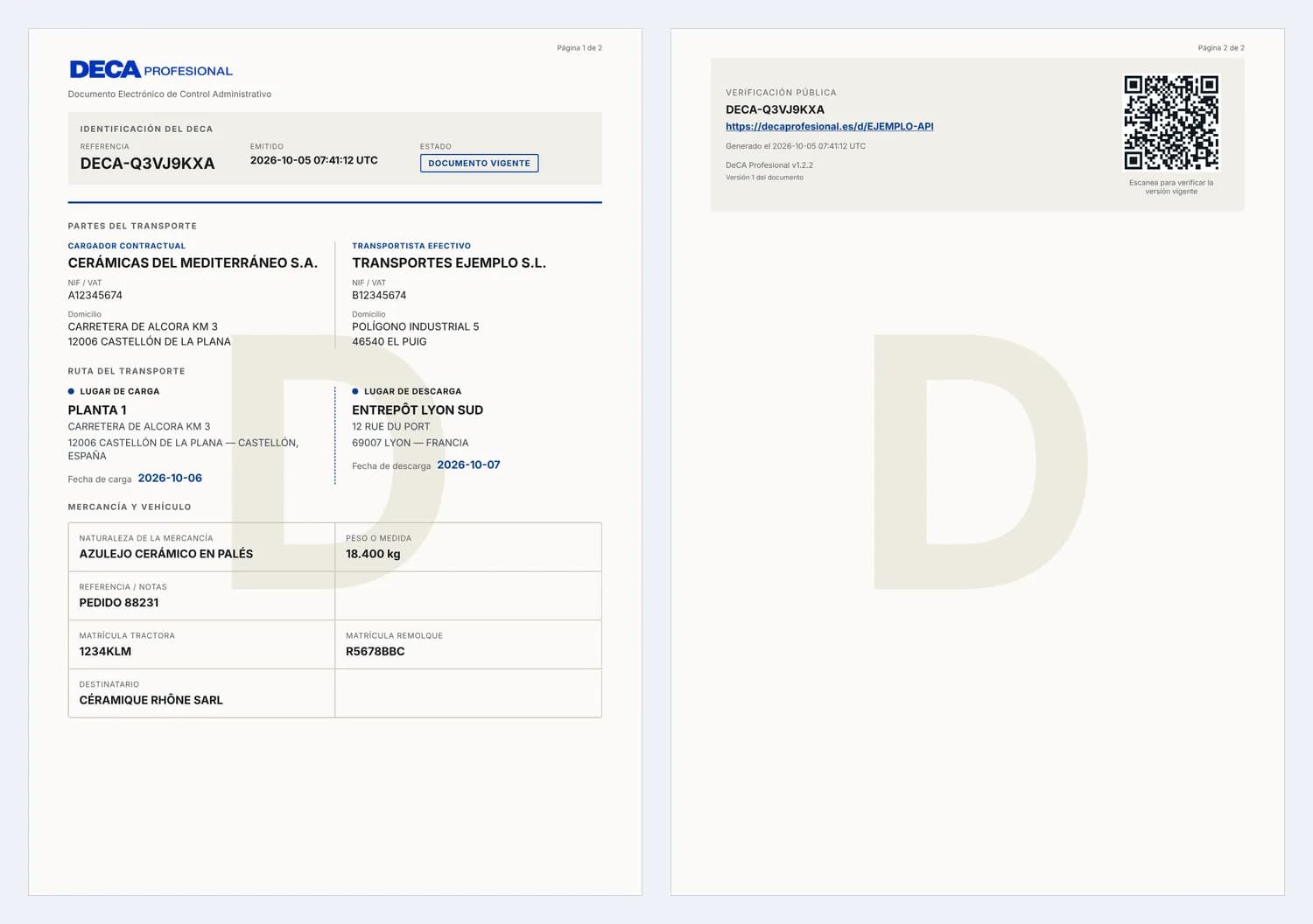
curl https://decaprofesional.es/api/v1/decas/<id>/pdf \
  -H "Authorization: Bearer $DECA_API_KEY" -o deca.pdf
Corrections
A correction replaces all the data of the DeCA and creates a new version with a new verification URL, new QR code and new PDF. Previous versions are kept (GET /versions). Always print or send the latest URL. The externalId cannot be changed and an annulled DeCA cannot be corrected. It returns 201 with the DeCA in its new version (200 if it is a retry with the same Idempotency-Key).
Optionally send baseVersionNo (the version you read): if the DeCA has changed since then, it returns 409 version_conflict instead of overwriting. A correction is still the same transport: if the dates, the route (towns) and the parties (tax ID of the shipper or of the carrier) all change at once compared with version 1, it returns 422 new_service_required and you must create a new DeCA. Corrections do not use DeCAs from the plan allowance.
1. POST /decas
Version 1 with its verification URL.
2. POST /corrections
Version 2 with a new URL, QR code and PDF; the previous one is kept.
3. Print or send
Always the latest URL.
4. POST /annulment
Final: the URL shows that the DeCA has been annulled.
{
  "changeReason": "Trailer registration plate changed",
  "deca": "…the same full body as when creating…"
}
Vehicle change
If the tractor unit (or the trailer) changes during the transport, record the change instead of creating another DeCA. A new version is generated with a new URL, QR code and PDF, showing the initial vehicle and each change with its date; it does not use a DeCA from the plan allowance. The date must fall within the transport and you can record successive changes. Retrieve the history with GET /api/v1/decas/{id}/vehicles; in the DeCA resource, data.currentVehicle is the current vehicle and data.vehicleChanges the list of changes.
{
  "tractorPlate": "5678 NPR",
  "effectiveAt": "07-10-2026",
  "reason": "Tractor unit broke down en route"
}
Annulment
Annulment is final: the public URL then shows that the document has been annulled, and the QR code keeps resolving to that notice. Repeating the call returns 200 with no changes. The reason is required (3–500 characters).
{
  "reason": "Order cancelled by the customer"
}
Completion of a DeCA by a third party
If your ERP is missing data that another company knows — for example, the registration plate the carrier will assign or the exact unloading town — you can still create the DeCA and request that data from a third party. It is the same “Completion by the counterparty” feature as on the website: the third party receives an email with a secure link, fills in only the fields you ask for and, once no mandatory data is missing, the DeCA is generated automatically and becomes active, with its PDF, its QR code and its verification URL. It requires the same access as the rest of the API (Business plan with the API add-on active).
Add completionRequest to the body of POST /api/v1/decas, with the recipient's email (recipientEmail) and the fields they must complete (fields). Those fields may arrive empty; all the others must be valid, just as in a normal creation. The response is 202 Accepted with a draft (object: "deca_draft"), not an active DeCA. Optionally: recipientName, recipientType (shipper | carrier | authorized_person) and expiresInHours (1–48; 24 by default).
| Field that can be requested | What it is |
|---|---|
vehicle.tractorPlate | Registration plate of the tractor unit |
vehicle.trailerPlate | Registration plate of the trailer or semi-trailer |
shipments[N].unloadLocation | The full unloading place: name, address, postalCode and city |
shipments[N].unloadLocation.city (or .name, .address, .postalCode) | A single item of the unloading place |
shipments[N].unloadDate | Unloading date |
shipments[N].weight | Weight of the goods of that shipment in kg (not for passenger services). The third party types only the number (12.500, 12,5 t or 800 kg are all accepted) and it is stored normalised, e.g. «12.500 kg». The weight alone can be requested even if everything else is complete. On a DeCA already issued, the weight is changed with a correction (POST /decas/{id}/corrections). |
As on the website, only the registration plates and the unloading details can be requested: the loading place, the province, the country, the parties, the goods and the weight are always provided by whoever creates the DeCA (otherwise the API returns 422 invalid_completion_field).
{
  "externalId": "TR-45882",
  "loadDate": "06-10-2026",
  "unloadDate": "07-10-2026",
  "vehicle": {
    "tractorPlate": "",
    "trailerPlate": ""
  },
  "shipper": {
    "name": "CERÁMICAS DEL MEDITERRÁNEO S.A.",
    "taxId": "A12345674",
    "country": "ES",
    "address": "Carretera de Alcora km 3",
    "postalCode": "12006",
    "city": "Castellón de la Plana"
  },
  "carrier": "self",
  "shipments": [
    {
      "loadLocation": {
        "name": "Planta 1",
        "address": "Carretera de Alcora km 3",
        "postalCode": "12006",
        "city": "Castellón de la Plana",
        "country": "ES"
      },
      "unloadLocation": {
        "name": "Almacenes Norte",
        "address": "Polígono Arasur, calle C 14",
        "postalCode": "01230",
        "city": "",
        "country": "ES"
      },
      "goods": "Azulejo cerámico en palés",
      "weight": 18400
    }
  ],
  "completionRequest": {
    "recipientEmail": "operaciones@transportista.example",
    "recipientType": "carrier",
    "fields": [
      "vehicle.tractorPlate",
      "vehicle.trailerPlate",
      "shipments[0].unloadLocation.city"
    ]
  }
}{
"id": "cmupjfyb600uvvos0tycclmsp",
"object": "deca_draft",
"status": "pending_completion",
"decaId": null,
"externalId": "TR-45882",
"missingFields": [
"shipments[0].unloadLocation.city",
"vehicle.tractorPlate"
],
"createdAt": "2026-10-01T14:56:31+02:00",
"updatedAt": "2026-10-01T14:56:31+02:00",
"completionRequest": {
"id": "cmupjfybh00uxvos0uwlt3pjv",
"status": "pending",
"requestedFields": [
"shipments[0].unloadLocation.city",
"vehicle.tractorPlate",
"vehicle.trailerPlate"
],
"recipientEmail": "operaciones@transportista.example",
"createdAt": "2026-10-01T14:56:31+02:00",
"expiresAt": "2026-10-02T14:56:31+02:00",
"completedAt": null
},
"warnings": []
}The secure link
The link is sent by email to the recipient only; the API never returns it. It is personal, single-use and expires after expiresInHours hours. The third party needs no account, sees only your company name and the fields you ask for, and cannot change any other data. The email states which company is requesting the data, the expiry date and what happens when the data is submitted.
When the third party completes the data
The data is validated and added to the draft. If no mandatory data is missing any more, the DeCA is generated automatically with your integration as its author (it keeps your externalId), the draft becomes issued and its decaId is the active DeCA; the third party receives a copy by email. If data is still missing, the draft stays in draft and missingFields tells you which.
Checking the status
GET /api/v1/decas/{id} responds to both the draft id and the id of the issued DeCA (which also includes completionRequest). Draft statuses:
pending_completion— A request is open: the third party has not sent the data yet.draft— Data is missing (missingFields) and no request is open: ask for the data or resend.ready— Nothing is missing, but the DeCA could not be issued (for example, the plan allowance is used up). It can be issued from the dashboard.issued— The DeCA is now in force: retrieve it with decaId.cancelled— The draft was cancelled from the dashboard.
completionRequest.status: pending, completed, expired or replaced (superseded by a resend).
{
  "id": "cmupjfyb600uvvos0tycclmsp",
  "object": "deca_draft",
  "status": "issued",
  "decaId": "cmupjfyzn00vzvos06903zz7y",
  "externalId": "TR-45882",
  "missingFields": [],
  "createdAt": "2026-10-01T14:56:31+02:00",
  "updatedAt": "2026-10-01T14:56:32+02:00",
  "completionRequest": {
    "id": "cmupjfynd00vmvos07hmyqdfy",
    "status": "completed",
    "requestedFields": [
      "shipments[0].unloadLocation.city",
      "vehicle.tractorPlate",
      "vehicle.trailerPlate"
    ],
    "recipientEmail": "operaciones@transportista.example",
    "createdAt": "2026-10-01T14:56:32+02:00",
    "expiresAt": "2026-10-02T14:56:32+02:00",
    "completedAt": "2026-10-01T14:56:32+02:00"
  }
}{
"id": "cmupjfyb600uvvos0tycclmsp",
"object": "deca_draft",
"status": "draft",
"decaId": null,
"externalId": "TR-45882",
"missingFields": [
"shipments[0].unloadLocation.city",
"vehicle.tractorPlate"
],
"createdAt": "2026-10-01T14:56:31+02:00",
"updatedAt": "2026-10-01T14:56:31+02:00",
"completionRequest": {
"id": "cmupjfybh00uxvos0uwlt3pjv",
"status": "expired",
"requestedFields": [
"shipments[0].unloadLocation.city",
"vehicle.tractorPlate",
"vehicle.trailerPlate"
],
"recipientEmail": "operaciones@transportista.example",
"createdAt": "2026-10-01T14:56:31+02:00",
"expiresAt": "2026-10-01T14:56:30+02:00",
"completedAt": null
}
}Requesting the data later
You can also create the draft first ("draft": true instead of completionRequest) and request the data later. If a request is already pending, the response is 409 completion_request_pending; if the DeCA is already active, 409 deca_already_issued (use a correction).
{
  "recipientEmail": "operaciones@transportista.example",
  "fields": [
    "vehicle.tractorPlate",
    "shipments[0].unloadLocation.city"
  ],
  "expiresInHours": 48
}{
"id": "cmupjfyhp00v8vos059cdhihy",
"completionRequest": {
"id": "cmupjfyij00vcvos0ga6ikvio",
"status": "pending",
"requestedFields": [
"shipments[0].unloadLocation.city",
"vehicle.tractorPlate"
],
"recipientEmail": "operaciones@transportista.example",
"createdAt": "2026-10-01T14:56:31+02:00",
"expiresAt": "2026-10-03T14:56:31+02:00",
"completedAt": null
}
}Resending the request
POST /api/v1/decas/{id}/completion-request/resend sends a new link to the same recipient with the fields that have not been completed yet; the previous link stops working. Use it, for example, when the link has expired. Optional body: { "expiresInHours": 24 }. Up to 5 resends per draft per hour; a request that has already been completed returns 409 completion_request_completed.
{
  "id": "cmupjfyb600uvvos0tycclmsp",
  "completionRequest": {
    "id": "cmupjfynd00vmvos07hmyqdfy",
    "status": "pending",
    "requestedFields": [
      "shipments[0].unloadLocation.city",
      "vehicle.tractorPlate",
      "vehicle.trailerPlate"
    ],
    "recipientEmail": "operaciones@transportista.example",
    "createdAt": "2026-10-01T14:56:32+02:00",
    "expiresAt": "2026-10-02T14:56:32+02:00",
    "completedAt": null
  }
}
Security and idempotency
A credential only sees and manages the drafts of its own integration (with deca:read_company, it can read all of its company's drafts). All these calls require Idempotency-Key: if you repeat one with the same key, you receive the same response (200, Idempotent-Replayed: true) without creating another draft, another request or another email. Every step is logged: who requested it, when the link was opened, who completed what and when the DeCA was generated.
Drafts: several transports at once
If your system prepares several transports in parallel, open one draft for each with POST /api/v1/drafts. Each draft is independent and has its own draftId: you can have as many open at the same time as you need, complete them step by step and generate each DeCA when it is ready, without one draft overwriting another. A draft does not use your plan allowance; the allowance is used only when the final DeCA is generated.
The body is the same as for POST /api/v1/decas, but it may be incomplete. Each response states ready and, if something is missing, issues with the same error details that direct creation would return.
Open drafts also appear on the website, under My DeCA › Pending drafts (with the “API” label and your externalId), for the users of your company who can create DeCAs. From there they can be continued in the wizard, generated or discarded. If it is generated from the website, the draft becomes generated with its decaId (and an empty generatedByApiCredentialId); if it is discarded, it becomes cancelled. Check it with GET /api/v1/drafts/{id}.
{
  "externalId": "VIAJE-4471",
  "reference": "Pedido 88231",
  "loadDate": "06-10-2026",
  "unloadDate": "07-10-2026",
  "shipper": {
    "name": "CERÁMICAS DEL MEDITERRÁNEO S.A.",
    "taxId": "A12345674",
    "country": "ES",
    "address": "Carretera de Alcora km 3",
    "postalCode": "12006",
    "city": "Castellón de la Plana"
  },
  "carrier": "self"
}{
"id": "cmuqr2x0k0001vo8k3d1f9a7b",
"draftId": "cmuqr2x0k0001vo8k3d1f9a7b",
"object": "api_draft",
"origin": "api",
"status": "open",
"version": 1,
"externalId": "VIAJE-4471",
"data": {
"...": "the body you sent"
},
"ready": false,
"issues": [
{
"path": "/vehicle",
"code": "invalid_type",
"message": "Required"
},
{
"path": "/shipments",
"code": "invalid_type",
"message": "Required"
}
],
"decaId": null,
"generatedAt": null,
"cancelledAt": null,
"createdAt": "2026-10-02T11:12:04+02:00",
"updatedAt": "2026-10-02T11:12:04+02:00",
"links": {
"self": "/api/v1/drafts/cmuqr2x0k0001vo8k3d1f9a7b",
"generate": "/api/v1/drafts/cmuqr2x0k0001vo8k3d1f9a7b/generate"
}
}To complete it, send only what changes with PATCH /api/v1/drafts/{id} (JSON Merge Patch: objects are merged, arrays such as shipments are replaced in full and null deletes a field). To avoid overwriting a change made by another process, send the If-Match header with the ETag you received: if the draft has changed in the meantime, the response is 412.
{
  "vehicle": {
    "tractorPlate": "1234 KLM"
  },
  "shipments": [
    {
      "loadLocation": {
        "name": "Planta 1",
        "address": "Carretera de Alcora km 3",
        "postalCode": "12006",
        "city": "Castellón de la Plana",
        "country": "ES"
      },
      "unloadLocation": {
        "name": "Almacenes Norte",
        "address": "Polígono Arasur, calle C 14",
        "postalCode": "01230",
        "city": "Ribabellosa",
        "country": "ES"
      },
      "goods": "Azulejo cerámico en palés",
      "weight": 18400
    }
  ]
}
When ready is true, generate the DeCA with POST /api/v1/drafts/{id}/generate. It goes through exactly the same validations and the same plan limit as POST /api/v1/decas and returns 201 with the active DeCA (PDF, QR code and verification URL). The draft becomes generated with its decaId and the generation date; it can no longer be modified, and repeating the call returns the same DeCA (200), never a new one. The other drafts are unaffected. GET /api/v1/drafts lists the open ones (?status=generated, cancelled or all for the rest) and DELETE /api/v1/drafts/{id} discards one you no longer need.
Each draft belongs to your company and to the integration that created it: with another key, someone else's draftId returns 404, just like one that does not exist. This feature is new and changes nothing that existed before: POST /api/v1/decas with draft: true or completionRequest keeps working as it did.
End-to-end example: a real transport operation
This is how everything fits together on a normal day: your ERP or TMS prepares the transport, your team reviews it in the dashboard if needed, the carrier completes the registration plates and your system receives each step by webhook. Each step is a call described on this page.
1. Sync your saved data from the ERP
PUT /api/v1/saved/companies/CLI-0042 · PUT /api/v1/saved/places/ALM-VLCWith your stable identifier (externalId): repeating the call updates, it never duplicates. Whatever you change in the dashboard is visible in the API and vice versa.
2. Create the transport draft
POST /api/v1/drafts (Idempotency-Key)With what the ERP already knows (shipper, places, goods, dates). The registration plate may be missing: it returns ready=false and issues listing what is pending. It does not use up the allowance.
3. Continue it from the dashboard if needed
Mis DeCA › Borradores pendientesThe draft appears with the «API» label and your externalId. With deca:read_company your integration also sees the drafts started on the website, including scheduled ones.
4. Ask the carrier for the registration plates
POST /api/v1/decas/{id}/completion-requestA temporary link so the carrier completes only the requested fields. When they complete them you receive completion.completed (only the field names, never the values).
5. Generate the DeCA and its load order
POST /api/v1/decas with loadOrder { format: "separate", price, conditions }A DeCA with its QR code and PDF, and the linked load order (combined or separate) if your company is the shipper. You receive deca.created and load_order.issued. Repeating with the same Idempotency-Key creates nothing new.
6. Receive the confirmations by webhook
deca.created · load_order.issued · load_order.accepted · deca.corrected · deca.service_finishedVerify the DeCA-Signature signature and discard duplicates by event id. load_order.accepted arrives when the carrier accepts the order through their link.
7. Retrieve references and documents
GET /api/v1/decas/{id} · GET /api/v1/decas/{id}/pdf · GET /api/v1/load-orders?decaId={id}The DECA-… reference, the verification URL, the current PDF, the load order with its status and acceptance, and service.finished when the service is marked as finished.
Test environment (sandbox)
In Integrations → Integration hub, create a test key: it starts with fvd_test_. With it your integration calls the same URLs with the same bodies and receives the same validations and errors, but the documents are test documents: they are not DeCAs, they do not use your allowance, they do not appear in the History or in billing, and their PDF carries the watermark “PRUEBA · SIN VALIDEZ” (test · not valid). When everything works, swap the key for a live one (fvd_live_) without changing anything else.
- Available with the test key:
GET /me(returnsmode: "test"),POST /decas/validate,POST /decas,GET /decas,GET /decas/{id},/status,/pdf,/correctionsand/annulment. Everything else returns 403sandbox_not_supported. - Responses carry
livemode: false, the id starts withtest_and the reference withPRUEBA-. - Webhooks for your test documents are sent to your endpoints with
livemode: false, so you can test receiving them as well. - Up to 2 active test keys, in addition to the 2 live ones.
Errors on demand. Create a document with externalId: "PRUEBA-ERROR-<code>" and the API will return that error, exactly as in production, so you can check how your software handles it:
| externalId | HTTP | Response |
|---|---|---|
| PRUEBA-ERROR-duplicate_external_id | 409 | An active DeCA with this externalId already exists. |
| PRUEBA-ERROR-plan_allowance_exhausted | 402 | You have reached the DeCAs included in your plan this month. |
| PRUEBA-ERROR-rate_limited | 429 | Per-minute request limit exceeded. |
| PRUEBA-ERROR-daily_create_ceiling | 429 | Daily technical creation limit reached. |
| PRUEBA-ERROR-generation_failed | 500 | The DeCA could not be generated. Please try again. |
| PRUEBA-ERROR-service_unavailable | 503 | The API is temporarily unavailable. |
Webhooks: your system finds out on its own
In Integrations → Integration hub → Webhooks, set the https:// URL of your system and the events you are interested in. Each notification is a signed JSON POST; your server must respond with 2xx within 10 seconds. Otherwise we retry after 1, 5 and 30 minutes and after 2, 6, 12 and 24 hours, always with the same DeCA-Event-Id, so that you can discard duplicates. From the dashboard you can send a test event, view each delivery and resend the failed ones.
| Event | When |
|---|---|
| deca.created | A DeCA is created in your company (website, API, draft or third party). |
| deca.corrected | A DeCA is corrected or a vehicle change is recorded (new version). |
| deca.annulled | A DeCA is annulled. |
| draft.generated | An API draft becomes a DeCA. |
| completion.completed | A third party completes the data you asked them for (only the field names, never the values). |
| deca.service_finished | The service is marked as finished (operational data: the DeCA, its PDF and its administrative status do not change). Includes the note, if any. |
| deca.service_reopened | A service marked as finished is reopened (it goes back to pending). |
| load_order.issued | A load order is issued (with its DeCA, on its own, or pending registration plates). Includes number, format, status and the linked DeCA; never the price or the conditions. |
| load_order.accepted | The carrier accepts a version of the order through their link. Includes the accepted version and the date; the typed name is not sent. |
| webhook.test | Test event sent from the dashboard. |
Headers: DeCA-Event-Id, DeCA-Event-Type and DeCA-Signature in the format t=<seconds>,v1=<HMAC-SHA256 hex of "<t>.<body>">, computed with the secret that is shown only once, when the endpoint is created. Notifications include identifiers and references, not the personal data in the DeCA: retrieve it through the API if you need it.
{
  "id": "evt_4n8Qx2kY0pLmRs7T",
  "type": "deca.created",
  "createdAt": "2026-10-08T10:41:00+02:00",
  "livemode": true,
  "data": {
    "deca": {
      "id": "cmupjfyhp00v8vos059cdhihy",
      "reference": "DECA-A4F2C9E1",
      "externalId": "TR-45882",
      "status": "active",
      "version": 1,
      "verificationUrl": "https://decaprofesional.es/d/A4F2C9E1…",
      "links": {
        "self": "/api/v1/decas/cmupjfyhp00v8vos059cdhihy",
        "pdf": "/api/v1/decas/cmupjfyhp00v8vos059cdhihy/pdf"
      }
    },
    "source": "api"
  }
}import { createHmac, timingSafeEqual } from "node:crypto";
// rawBody: the EXACT body received (do not re-serialise it); secret: dcwh_… (Integrations → Webhooks)
export function isValidWebhook(rawBody, signatureHeader, secret) {
const m = /^t=(\d+),v1=([a-f0-9]{64})$/.exec(signatureHeader ?? "");
if (!m) return false;
if (Math.abs(Date.now() / 1000 - Number(m[1])) > 300) return false; // older than 5 min: possible replay attack
const expected = createHmac("sha256", secret).update(`${m[1]}.${rawBody}`).digest();
const received = Buffer.from(m[2], "hex");
return expected.length === received.length && timingSafeEqual(expected, received);
}
// Respond 2xx within 10 s and process afterwards. Use DeCA-Event-Id so you never process the same event twice.Power Automate and Make: connect without writing code
If your ERP or TMS already connects to Power Automate or Make (Odoo, Sage, Holded, Dynamics and many more do), you can generate DeCAs without writing code: the tool reads the shipment from your system and calls the API. What we cannot do for you is make your software export its data: that depends on it having an integration with these tools or an API of its own. These are not native integrations: we provide the definition for building a custom connector and a step-by-step guide.
Power Automate (Microsoft)
A custom connector with every API call, created from the Swagger file in the kit. Each call then appears as one more action in your flows.
- Download deca-power-automate.swagger.json (link below).
- In Power Automate, open Data → Custom connectors → New custom connector → Import an OpenAPI file, name it «DeCA Profesional» and select the file.
- Under Security, keep «API Key», with the parameter name Authorization and the location Header.
- Click «Create connector». Under Test, create a connection and paste as the key: Bearer followed by your API key (create it in Integrations («Integraciones») → Integration centre («Centro de integración»)).
- Test GET /api/v1/me: if it responds with your company name, the connection works.
- In your flow (for example, «when a delivery note is created in Dynamics, SharePoint or Excel»), add the «Create a DeCA» action and map each field to the one in your system according to the field mapping table.
Custom connectors require a Power Automate licence that includes them (Premium). Set a different Idempotency-Key value for each shipment, for example with the guid() function.
Make
With the HTTP «Make a request» module you call any endpoint, and with «Webhooks → Custom webhook» you receive the notifications from DeCA Profesional.
- Add the HTTP → Make a request module.
- URL: https://decaprofesional.es/api/v1/decas · Method: POST.
- Headers: Authorization = Bearer <your key> · Idempotency-Key = {{uuid}} · Content-Type = application/json.
- Body type: Raw · Content type: JSON (application/json) · Request content: the DeCA JSON with the fields of your ERP mapped (field mapping table). Tick «Parse response».
- To receive notifications, create a Webhooks → Custom webhook module, copy its https URL and add it in Integrations («Integraciones») → Integration centre («Centro de integración») → Webhooks.
- To keep your saved data up to date, use the same HTTP module with PUT /api/v1/saved/{resource}/{externalId} and your ERP's code as the externalId.
Store the key in a Make connection or variable, never in visible text in the scenario. If your scenario cannot verify the webhook signature, use only the event id and read the DeCA through the API.
Field mapping: from your ERP to the API
The concept is the same in any ERP; the Odoo column shows the standard field of its Inventory, Contacts and Fleet modules. In Sage, Holded or Dynamics, look for the equivalent field: the exact name depends on each installation.
| In your ERP | API field | Odoo example | Tip |
|---|---|---|---|
| Delivery note or shipment number | externalId | stock.picking · name | Unique per shipment: prevents duplicates. |
| Loading date | loadDate | stock.picking · scheduled_date | In DD-MM-YYYY. |
| Unloading date | unloadDate | stock.picking · date_deadline | In DD-MM-YYYY; the same as or later than the loading date. |
| Shipper (customer or your company) | shipper | res.partner · name, vat, street, zip, city | "self" if it is you. |
| Carrier | carrier | res.partner of the carrier | "self" if you carry the goods yourself. |
| Tractor unit registration plate | vehicle.tractorPlate | fleet.vehicle · license_plate | With or without spaces or hyphens. |
| Trailer registration plate | vehicle.trailerPlate | fleet.vehicle · license_plate | Optional. |
| Warehouse or loading address | shipments[0].loadLocation | stock.picking · picking_type_id.warehouse_id.partner_id | name, address, postalCode, city, country. |
| Delivery address | shipments[0].unloadLocation | stock.picking · partner_id | If it is missing, ask the other party for it (completionRequest). |
| Description of the goods | shipments[0].goods | stock.move · product_id.name | Short text, for example «Pallets of ceramic tiles». |
| Weight | shipments[0].weight | stock.picking · weight | A number in kg or text with its unit. |
Permissions (scopes)
Each credential has only the permissions its integration needs.
| deca:create | Create DeCAs (POST /decas, also in batches) and validate them (POST /decas/validate), create, modify and generate drafts, and ask a third party for data. |
| deca:read | Read and list the DeCAs created by this integration, and its drafts, batches and load orders. |
| deca:read_company | Extend read access to all the company's DeCAs. It never extends write access. |
| deca:correct | Correct DeCAs created by this integration, record vehicle changes, and mark a service as finished or reopen it. |
| deca:annul | Annul DeCAs created by this integration. |
| saved:read | Read the company's saved data: saved companies, vehicles, places and shipments. |
| saved:write | Create, update (PUT by externalId) and delete saved data from your ERP or TMS. |
Limits
- 60 requests per minute per credential (headers
X-RateLimit-Limit,X-RateLimit-Remaining,X-RateLimit-Reset). - A daily technical ceiling on creation per credential (5,000 DeCAs) and a temporary lockout after several failed authentication attempts.
- Bodies of up to 256 KB and up to 50 shipments per DeCA.
- The monthly DeCA allowance is your plan's;
GET /api/v1/meshows the usage and what is left. - When you exceed a limit you receive
429withRetry-After: wait and retry.
Errors
All errors share the same format. code is stable and is what your integration should branch on; message is informative: send Accept-Language: en to receive it in English (Spanish by default). If you contact support, quote the requestId.
{
  "error": {
    "code": "validation",
    "message": "The DeCA does not meet the mandatory requirements.",
    "requestId": "req_7f3a9c…",
    "details": [
      {
        "path": "/shipments/0/unloadLocation/country",
        "code": "invalid_country",
        "message": "Use an ISO 3166-1 alpha-2 country code (e.g. ES, FR, PT)"
      }
    ]
  }
}| HTTP | code | Meaning |
|---|---|---|
| 400 | invalid_json, idempotency_key_required, invalid_query | Malformed request, missing Idempotency-Key, or an invalid filter. |
| 401 | invalid_credentials, credential_revoked, credential_expired | Unknown or incorrect key (the same response in both cases), revoked or expired. |
| 402 | business_plan_required, plan_allowance_exhausted | The company's plan does not include the API, or the plan's DeCA allowance is used up. |
| 403 | api_addon_required, api_advanced_required, professional_plan_required, company_inactive, ip_not_allowed, insufficient_scope, sandbox_not_supported | The API add-on is not active, the account is not active, the IP address is not authorised, the permission is insufficient, or the endpoint is not available with a test key. |
| 429 | api_lite_limit_reached | API Lite: the 100 DeCAs of the month have already been created through the API (within the plan allowance). It renews with the plan period; for more, API Advanced. |
| 404 | not_found | It does not exist or is not visible to this credential (the two cases are never distinguished). |
| 409 | duplicate_external_id, idempotency_conflict, deca_annulled, version_conflict, batch_without_documents, saved_in_use, company_inactive | externalId already used by an active DeCA (includes existingId), idempotency key reused with a different body, annulled DeCA, concurrent correction, batch that has not created any DeCA yet, saved place used by a saved shipment, or the company has no Administrator when syncing saved data. |
| 402 / 403 / 409 / 422 | load_order_plan_required, load_order_not_shipper, load_order_company_nif_missing, load_order_invalid, load_order_passenger | Load order with POST /decas (loadOrder): the plan does not include load orders (402), your company is not the contractual shipper (403), your company's tax ID (NIF) is missing (409), the commercial data is not valid (422, details points to the field under /loadOrder/…) or the service is a passenger service (422). No DeCA is created. |
| 409 | deca_already_issued, completion_request_pending, completion_request_completed, draft_cancelled | Third-party requests: the DeCA is already in force (use a correction), a request is already pending (use /resend), the request has already been completed, or the draft was cancelled. |
| 409 | draft_not_open, draft_limit_reached, draft_has_preparation, completion_request_no_email | Drafts: already generated or cancelled, limit of open drafts reached (includes limit), web draft linked to a third-party request (generate it with /api/v1/decas/{id}), or the request has no recipient email. |
| 412 | precondition_failed | If-Match does not match: the draft has changed since you last read it. Read it again (ETag header) and reapply your change. |
| 404 | completion_request_not_found | Resend requested for a DeCA without any third-party request. |
| 422 | invalid_draft, invalid_completion_request, new_service_required | The draft or the change is not a valid JSON object (or includes fields only allowed in POST /decas), the third-party request is not valid, or the correction changes the service (create a new DeCA). |
| 413 / 415 | payload_too_large, unsupported_media_type | Body larger than 256 KB, or not application/json. |
| 422 | validation | Invalid data. details lists each field with a JSON Pointer and a code (required, unknown_field, invalid_country, too_short, too_long, invalid_format, invalid_value, self_company_incomplete…). The message is informative only (Spanish by default; it can be requested in English with Accept-Language: en): integrations must branch on code. |
| 422 | invalid_completion_field | A field in completionRequest.fields cannot be requested from a third party (unknown_field) or refers to a shipment that does not exist (unknown_shipment). |
| 429 | rate_limited, daily_create_ceiling, too_many_failed_attempts | Request limit exceeded. Respect the Retry-After header. |
| 500 | generation_failed, internal_error | Generation error (includes correlationId and retryable: retry with the same Idempotency-Key) or internal error. |
| 503 | service_unavailable, pdf_unavailable | Service or PDF temporarily unavailable: retry. |
Frequently asked questions
What does the DeCA Profesional DeCA API do that a basic integration does not?
Besides creating the DeCA with its PDF and QR code, it lets you correct it (new version), record a vehicle change, annul it, work with drafts, ask a third party for the missing data, create batches of up to 50 DeCAs in one call with a ZIP file of the PDFs, and receive signed webhooks whenever something changes. Everything is described in an OpenAPI specification, and there are ready-to-use examples for Node.js, Python, PHP, Postman and Power Automate.
Can my ERP be notified when a DeCA is created, corrected or annulled?
Yes, with webhooks: you register an https URL in the integration centre and receive a signed notification (DeCA-Signature) for every DeCA created, corrected or annulled, draft generated, request completed by a third party, service finished or reopened, and load order issued or accepted. If your server does not respond, delivery is retried automatically and the event identifier does not change, so you never process it twice.
Can I generate many DeCAs at once?
Yes: POST /api/v1/decas/batch creates up to 50 DeCAs in a single call. Each one is validated and created separately, one error does not affect the others, a retry with the same Idempotency-Key duplicates nothing, and you can download all the PDFs in a ZIP file.
Where do I enter the API key?
Not in DeCA Profesional: it is configured in your own management software (ERP or TMS), usually by your IT staff or by that software's vendor. With it, your software sends the transport data to DeCA Profesional and instantly receives the DeCA, its PDF with QR code and the verification URL, without anyone having to fill it in on the website. If you do not use an ERP or TMS, or have nobody to build the integration, you do not need the API: you can create your DeCAs on the website.
Is there a test environment?
Yes. Create a test key (it starts with fvd_test_) in Integrations («Integraciones») → Integration centre («Centro de integración»): you call the same URLs and get the same validations, but the documents are test documents, they do not use up the allowance, they do not appear in the History («Historial»), and their PDF carries the PRUEBA (test) watermark. With externalId PRUEBA-ERROR-<code> you reproduce errors. And if you only want to validate a body, POST /api/v1/decas/validate creates nothing.
What happens if the connection drops while I am creating a DeCA?
Repeat the same call with the same Idempotency-Key and the same body: if the DeCA was already created, you receive that same DeCA (200 and Idempotent-Replayed: true); it is never duplicated.
How do I avoid creating two DeCAs for the same order?
Send your order or shipment identifier in externalId. If an active DeCA with that externalId already exists, the API returns 409 duplicate_external_id with the existingId, and you can retrieve it with GET /api/v1/decas?externalId=….
Does the QR code change if I correct the DeCA?
Yes. Each correction creates a new version with a new verification URL, a new QR code and a new PDF. Always store and share the latest verification.url; previous versions are kept in GET /versions.
Can I correct or annul through the API a DeCA created in the dashboard?
No. The API only corrects and annuls the DeCAs created by the same integration. With the deca:read_company permission you can read all the company's DeCAs, but never modify them.
How many DeCAs can I create?
Those included in your plan: the DeCAs created through the API and from the dashboard share the same monthly allowance. GET /api/v1/me tells you how many you have used this month and how many you have left.
What format do countries, dates and messages use?
Countries as two-letter ISO 3166-1 codes (ES, FR, PT…) and dates in DD-MM-YYYY (times in Madrid time with its offset, e.g. 2026-10-08T10:41:00+02:00). The PDF shows the country name in Spanish. Error messages are informative only: Spanish by default, and they can be requested in English with Accept-Language: en; integrations must always branch on code.
Can I create a DeCA even if I am missing the registration plate or the unloading place?
Yes, if you ask a third party for them: send completionRequest with their email and the missing fields (for example vehicle.tractorPlate). A draft is created, the third party receives a secure link and, once they complete it, the DeCA is generated automatically. Check the status with GET /api/v1/decas/{id}.
How long is the public URL available?
During the service and for the 7 days following the unloading date (servicePeriod.publicUntil). With your credential you can download the PDF at any time.
Integration support
Connecting your ERP or TMS?
Tell us which software you use and we will help you with access, credentials and the first tests.
Write to integraciones@praetoriaabogados.es